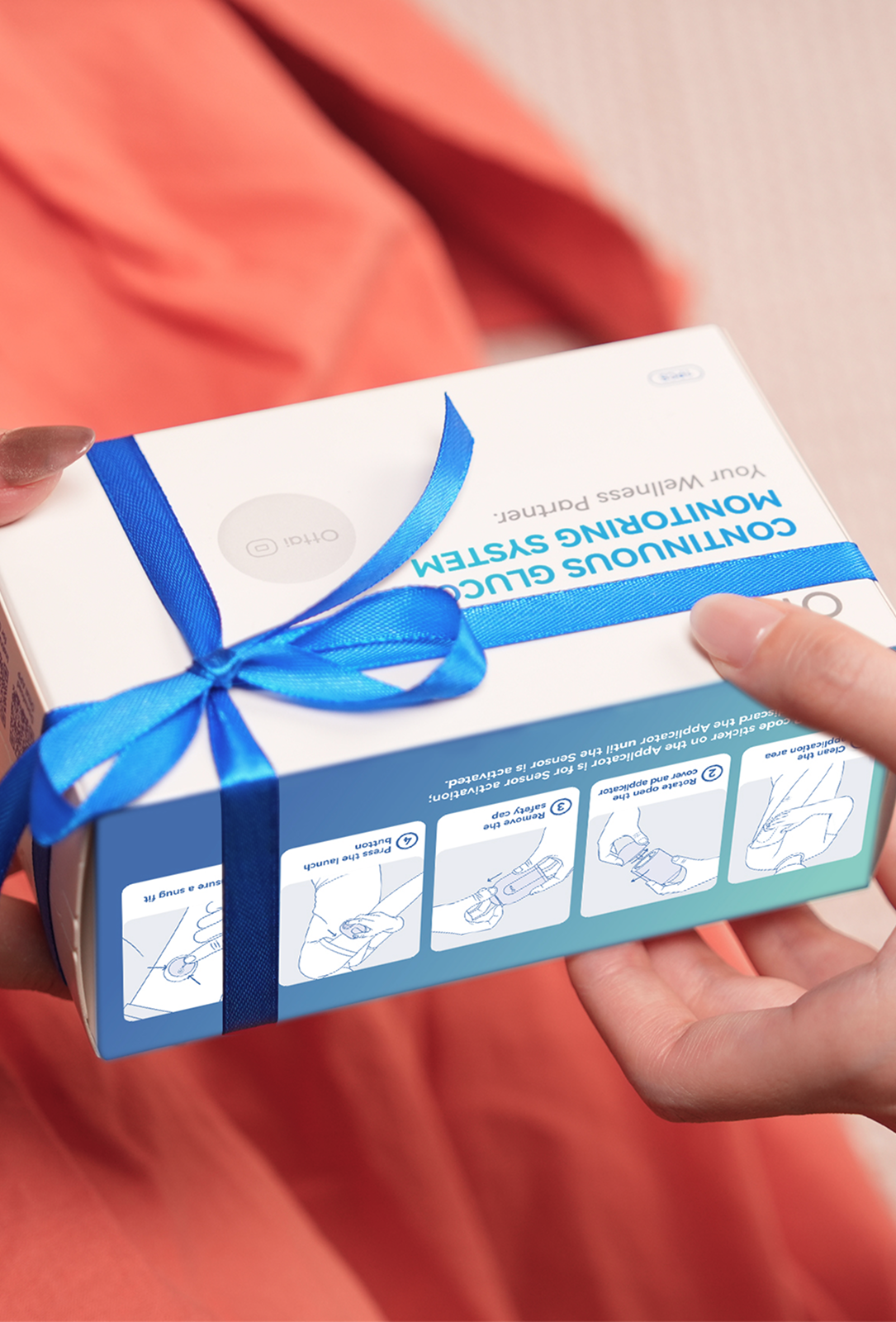
An average glucose of 6.1 mmol/L may look reassuring. But if the same Summary shows 4% of recorded time below range, there is more to understand. Which hours were low? Did the pattern repeat? What should you bring to your next appointment?
Your Ottai report helps you work through those questions, moving from an overview to individual days and meal records. This guide follows the report's nine numbered sections, using the examples in Ottai's report legends. Keep your own report open as you read. [1]
Glucose labels are shown in mmol/L, rounded to one decimal place. The report images below are cropped from Ottai's report legends and illustrate individual features rather than one complete patient report. Agree your own treatment targets with your diabetes team.

1. Basic information
Start by making sure you have opened the right report and selected the period you want to review. Before comparing it with an earlier report, check the dates and the target range used.
Compare periods of similar length, and note anything unusual, such as illness, travel or a change in routine. TIR can increase simply because a wider target range was used, even if the readings did not change. Later, check the daily graphs for missing hours: a report can only describe the readings it contains.
2. Summary
Read the four cards across the top first, then the range breakdown underneath. Each answers a different question. [1]
Average: 6.1 mmol/L
This is the average of the glucose readings included in the report. It helps you see whether your overall level is changing between comparable periods.
An average cannot show how high or low the readings went, or how long they stayed there. Higher and lower values can balance each other out. In this example, read the 6.1 mmol/L average alongside the 4% below range before deciding how reassuring the result is.
CV: 31.1%
CV, or coefficient of variation, describes how widely your glucose readings vary in relation to the average. A lower CV generally means less variation. It is not the percentage of time your glucose was high or low. [7]
The example shows 31.1%, below the report's displayed goal of less than 33%. That still does not rule out lows. If CV changes between reports, compare the daily curves to see when your readings became more or less variable. [1]
eHbA1c: 6.3%
This is the report's estimated HbA1c. Treat it as an estimate and keep your scheduled laboratory HbA1c checks. The blood test reflects roughly the previous 10–12 weeks, while your glucose report covers its selected period. The results can differ, so take both to your appointment rather than assuming one must be wrong. [1,3,4]
TITR: 71.1%
Time in tight range, or TITR, is the share of recorded time between 3.9 and 7.8 mmol/L in this example. Its 71.1% tells you how much time fell inside that narrower band. [1]
TITR sits inside time in range; it is not another slice to add to the chart. A reading can be outside the tight range and still within the wider range agreed for you. Ask whether tracking TITR is useful for your care before making it another number to chase.
The range breakdown: TAR 13%, TIR 83%, TBR 4%
· TAR — time above range: 13%. Recorded time above 10.0 mmol/L. The Very High category above 13.9 mmol/L is included within this total.
· TIR — time in range: 83%. Recorded time between 3.9 and 10.0 mmol/L.
· TBR — time below range: 4%. Recorded time below 3.9 mmol/L. The Very Low category below 3.0 mmol/L is included within this total. [1]
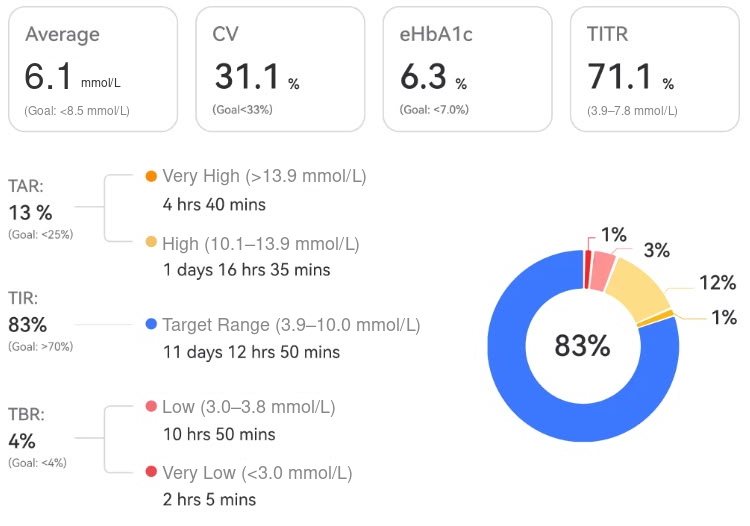
Original Summary panel, with glucose labels in mmol/L. Read its 83% in range alongside the 4% below range. The example's durations and percentages do not align exactly; use it to locate each measure, then check your own report.
Here is the practical point: the example shows 83% in range alongside 4% below range. With a printed TBR goal of less than 4%, that displayed result is a reason to review the low events. A strong TIR result does not cancel out time spent low.
For many adults with diabetes, 3.9–10.0 mmol/L is a commonly used range, with at least 70% in range and less than 4% below range. Targets need personalising, particularly during pregnancy or when the risk of hypoglycaemia is higher. [2]
3. Hyper/Hypoglycemic events
This section moves from percentages to episodes. The example shows 56 high-glucose events, with an average duration of 130 minutes, and 30 low-glucose events, averaging 67 minutes. [1]
The event count answers how often the app counted an episode. Average duration answers how long those episodes lasted on average. It does not mean every low lasted 67 minutes. The coloured bars help you identify the times of day that need a closer look.
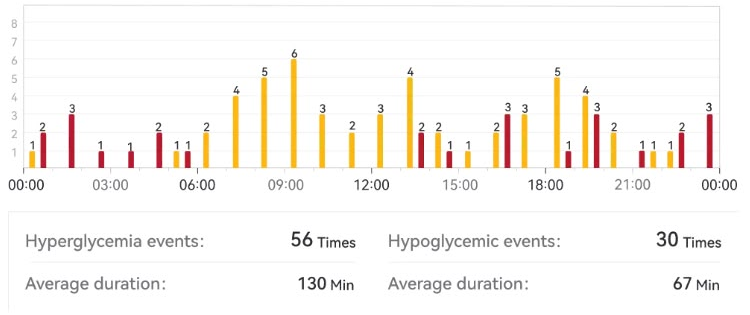
The original event chart separates frequency from average duration. Use the hourly bars to choose which times to investigate in the daily records.
If your own report shows repeated lows, contact your diabetes team promptly. Flag episodes you did not feel, including those overnight, and any hypo that required help from someone else. [5]
When to act on a low reading
The report calculates TIR from 3.9 mmol/L. Australian hypo advice generally uses blood glucose below 4.0 mmol/L as the point to act, including at 3.9. Follow your agreed hypo treatment plan promptly. Confirm with a finger-prick meter when possible, especially if the sensor reading does not match how you feel; if you have symptoms and cannot check, do not delay treatment. If someone becomes drowsy, cannot swallow or is unconscious, call 000 and give nothing by mouth. [5,6]
4. Insulin
This section summarises insulin injections entered in the app's Logbook–Insulin records. It depends on what has been logged; the glucose sensor does not measure how much insulin you injected. [1]
The example includes Daily Rapid-acting: 21.846 U/day and Daily Long-acting: 9.0 U/day. These are recorded averages for the example, not recommended doses. Total figures describe the logged amount across the reporting period; daily figures help you compare periods of different lengths.
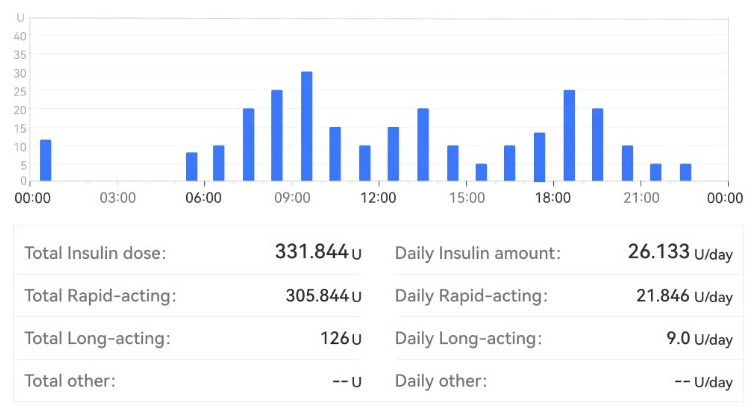
Original insulin panel. The category amounts do not add up to the displayed totals in this example. These are logged example values, not recommended doses.
Before using this section to explain a glucose pattern, check for missing injections, duplicate entries or a dose recorded at the wrong time. Otherwise, a difference in logging could look like a difference in treatment. Bring the relevant entries and your prescribed plan to your diabetes team; follow your agreed plan for any dose adjustments.
5. Daily glucose profiles
These small graphs let you compare actual days. In the example, the panels run from 1 to 15 November, with each day starting at midnight and its date in the top left corner. [1]
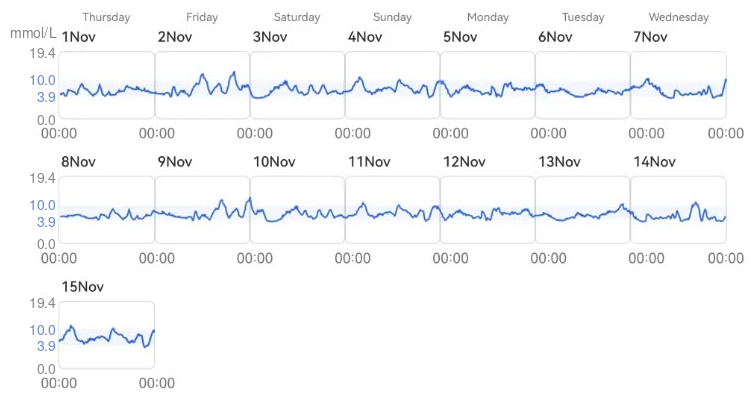
Original daily glucose profiles for 1–15 November, with glucose labels in mmol/L. Compare the same time of day across several panels, then use the dated Daily log to investigate a pattern.
Choose one question, such as whether glucose tends to fall overnight or stay elevated after an evening meal. Compare the same part of the clock across several days. A pattern that repeats deserves a different conversation from a single unusual day.
Look at the shape as well as the height. A brief peak and a long stretch above range may reach a similar maximum, but they contribute different amounts of time above range. Also look for gaps: a blank part of the graph means there is no visible record for that period.
Mark the dates you want to investigate. You can then use Daily log to check meal times, activity and other entries around the change, instead of trying to remember an entire fortnight.
6. AGP
The ambulatory glucose profile, or AGP, brings several days together on one 24-hour clock. It helps you see which times tend to be steady and which vary from day to day. It is a combined view, so no single day has to match its middle line. [1]
Read the picture in three layers:
· The middle line: the median, or middle glucose value at each time of day.
· The darker band: the middle 50% of readings, between the 25th and 75th percentiles.
· The lighter outer band: the middle 80%, between the 10th and 90th percentiles. Some readings sit outside this band. [1]
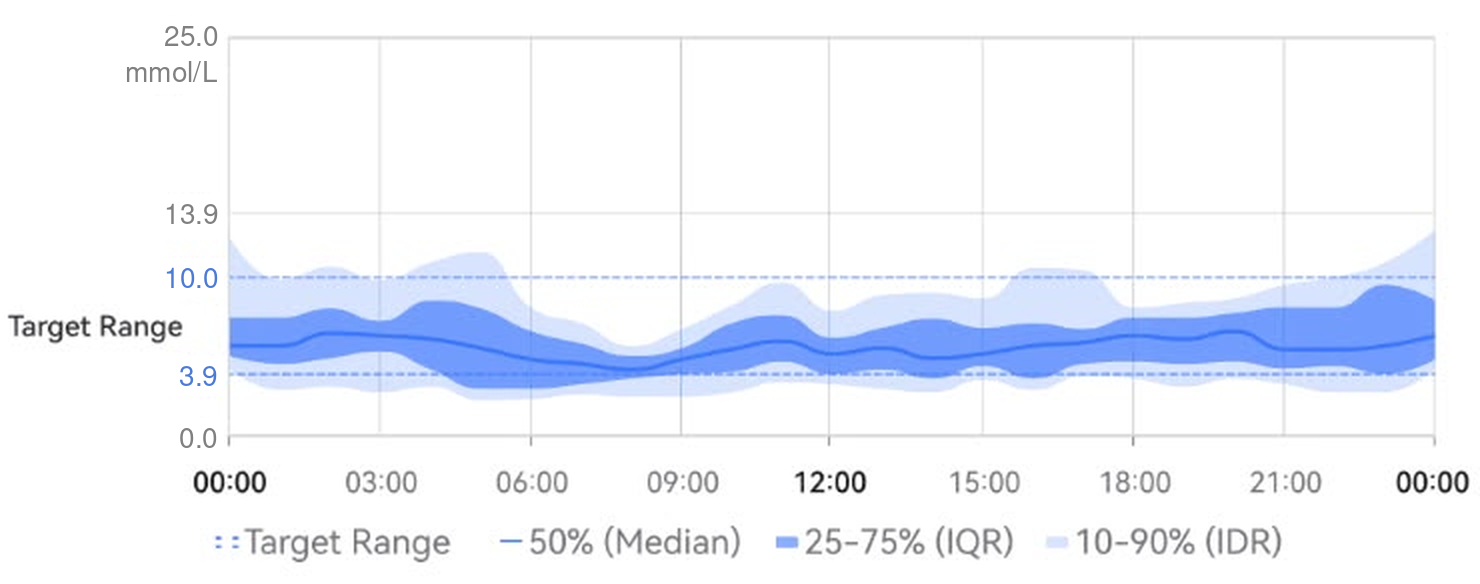
The original AGP panel shows the median and shaded percentile bands, with glucose labels in mmol/L. Part of the early-morning shading falls below the lower range boundary; check individual days to investigate that time.
In the original example, part of the shaded band falls below the lower range boundary in the early morning, even while the middle line stays within range. If you see this in your own AGP, return to the daily profiles and check that time window on individual days.
A wide band means readings at that time were more spread out across the days. It does not tell you the cause, or prove that every day included a large rise and fall. Ottai's legend describes an AGP based on at least five days of data. [1] For a routine review of glucose patterns, Australian Diabetes Society guidance recommends at least 70% data coverage across a 14-day period. Check how much data is available before treating the picture as your usual pattern. [7]
7. Daily meal-time glucose
This table lets you compare individual breakfasts, lunches, dinners and snacks. Pre-Meal is the reading associated with the pre-meal log. Post-Meal Peak is the highest reading in the three-hour period after the meal; it is not simply the reading at the three-hour mark. [1]
The original breakfast entries make the value of that comparison clear:
· 2 November: 5.9 mmol/L before the meal; peak 8.0 mmol/L.
· 3 November: 6.2 mmol/L before the meal; peak 9.8 mmol/L.
· 5 November: 4.6 mmol/L before the meal; peak 11.2 mmol/L. [1]
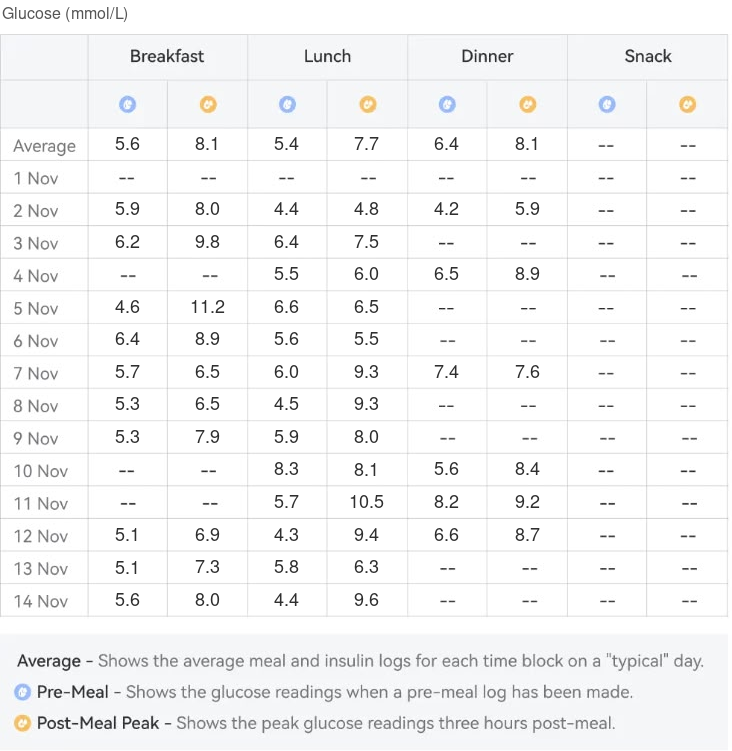
The original meal-time table shows pre-meal and peak readings for breakfast, lunch, dinner and snacks from 1 to 14 November, plus an average row. Glucose values are in mmol/L. The three breakfasts discussed above come from these rows.
A lower starting reading did not guarantee a lower peak. If you see a similar difference in your own report, open the relevant daily logs. Compare the recorded meal times, activity and insulin entries. Keep a separate note of what you ate and the portion size if those details are not recorded. The numbers alone cannot identify the cause of the difference.
If the same pattern keeps appearing, take those dates to your diabetes educator or dietitian. A useful question is: “These breakfasts started at different levels and peaked differently. What should I record so we can make a fair comparison?” A dash means no value is shown; it does not prove a meal was skipped.
8. Meal-time glucose summary
This section brings the meal categories together. Read across each row in the report's order: Pre-Meal, Post-Meal Peak, Post-meal Excursion, then the readings at 1, 2 and 3 hours. [1]
Peak tells you how high the reading reached. The timed readings show glucose at specific points after the meal. The dinner example displays 6.4 mmol/L before the meal and a peak of 8.1 mmol/L. Its timed figures are 6.4 at one hour, 5.9 at two hours and 5.9 at three hours. The summary does not show when the peak occurred. [1]
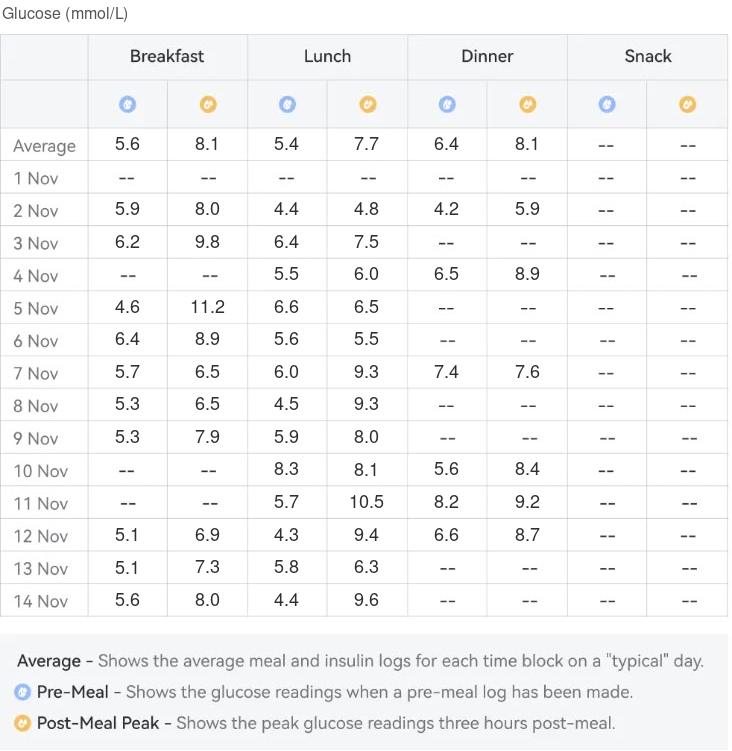
Original meal summary, with glucose labels in mmol/L. The displayed excursion values do not all match a simple calculation from the listed pre-meal and two-hour values. A dash means no value is shown; the snack row's 0.0 does not establish that a snack had no effect.
The dinner row helps separate two questions: how high glucose reached, and where it was at a fixed time after the meal. Its peak was 8.1 mmol/L, while the two- and three-hour readings were both 5.9 mmol/L. Check individual days before assuming every dinner followed the same pattern.
What “excursion” means here
Ottai describes Post-meal Excursion as the difference between the two-hour and pre-meal glucose levels. It answers a different question from the peak: how different was the later level from the starting level? [1]
The dinner row displays an excursion of 0.6 mmol/L. This is the value shown in the example, not the size of the rise to the peak. The displayed summary values do not fully explain how that result was obtained; check the individual meal records if the figures seem inconsistent. A small two-hour difference can occur alongside a higher peak within the three-hour window. Read the timed readings and daily curve together when discussing the pattern with your diabetes team.
9. Daily log
Daily log brings one day's glucose curve together with the entries made around it, including meals, insulin, medicines and activity. It is where you can investigate a time or date flagged earlier in the report. [1]
The original example for 1 November 2024 shows an average of 8.5 mmol/L, a highest reading of 10.4 mmol/L and a lowest of 6.0 mmol/L, with 95% TIR, 5% TAR and 0% TBR. [1]
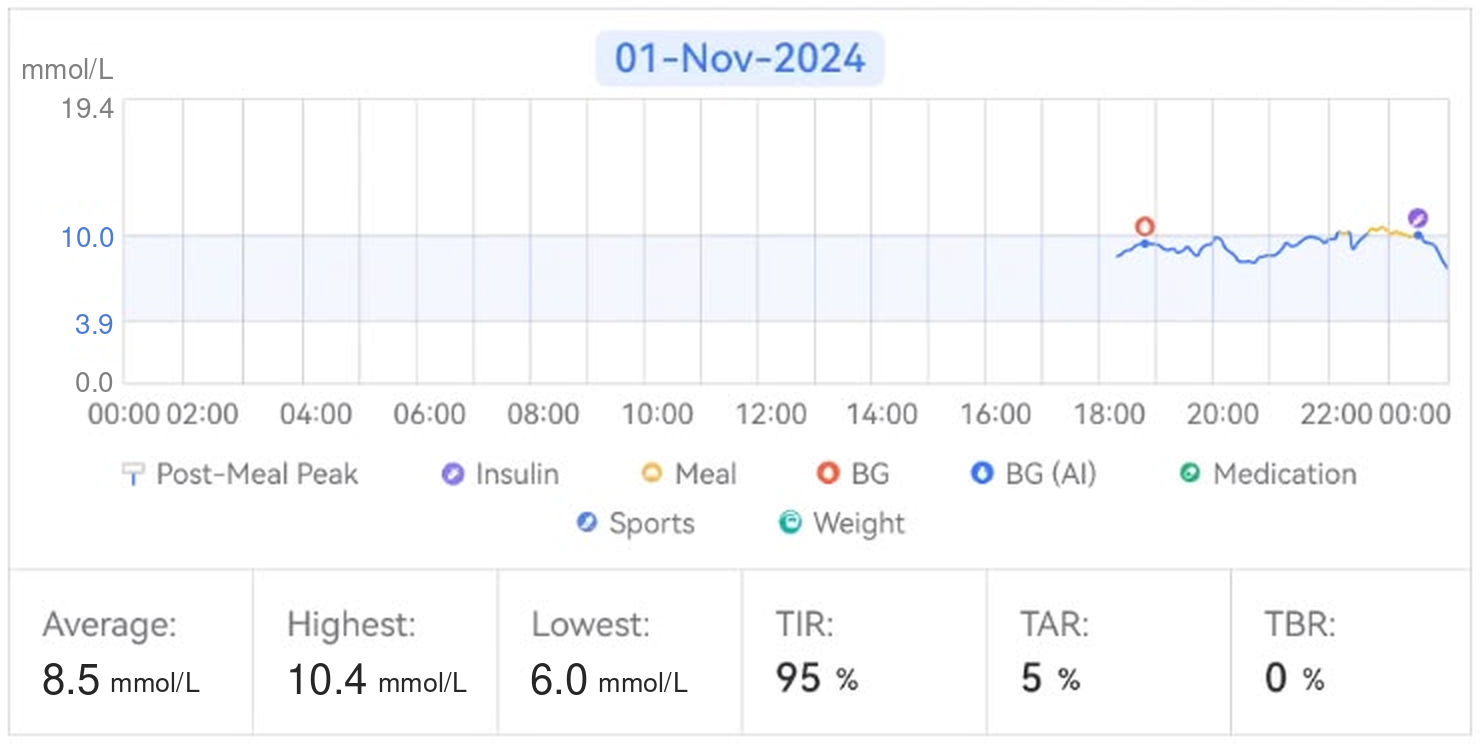
The original Daily log shows 95% time in range, while only an evening curve is visible. Glucose labels are in mmol/L. Check which hours are included before interpreting the figures as a complete day.
There is a detail worth checking before interpreting that 95%: in the screenshot, only an evening curve is visible. Check whether the earlier readings are missing or simply not shown, and which hours were included in the calculation. If data are missing, 0% below range cannot establish that no lows occurred during those hours.
Once you have checked coverage, choose the time you want to understand. Read the curve before and after the event, check the nearby log entries, and write down any useful details you remember. If a sensor reading does not match your symptoms, use a finger-prick check according to your care plan; CGM measures glucose in the fluid around cells and can lag behind blood glucose. [6]
If your own report has a similar gap, you could ask:
“Which hours are included in this percentage, and are there earlier readings that are not shown? I'd like to check that before comparing days.”
You do not need to solve every number at once. Finish with one pattern identified, the relevant dates saved and a clear question for your diabetes team.
This guide provides general education for adults using CGM. Follow your individual glucose targets, hypo treatment plan and agreed instructions for medicines or insulin.
1. Ottai app. Report content settings and report legends: Basic information; Summary; Hyper/Hypoglycemic events; Insulin; Daily glucose profiles; AGP; Daily meal-time glucose; Meal-time glucose summary; Daily log. Examples from the report legends, with glucose values expressed in mmol/L.
2. Diabetes Australia. Time in Range is an important tool. 7 December 2021. Source
3. National Diabetes Services Scheme (NDSS). HbA1c checks. Source
4. NDSS and Australian Diabetes Educators Association. Understanding HbA1c: A guide for health professionals. Version 2.0.0, July 2025. Source
5. NDSS. Low blood glucose levels (hypoglycaemia). Version 6.0.0, February 2026. Source
6. NDSS. Continuous Glucose Monitoring. Version 9, May 2025. Source
7. Australian Diabetes Society. Consensus Position Statement on Utilising the Ambulatory Glucose Profile (AGP) combined with the Glucose Pattern Summary to Support Clinical Decision Making in Diabetes Care. 2020. Source